
NADRA Pak ID Mobile App Download | Apply CNIC Online in 2026
Jan,19-2026
APK Size 19.1 MB
V 5.5.2
Android 6.0+
99999+

Description
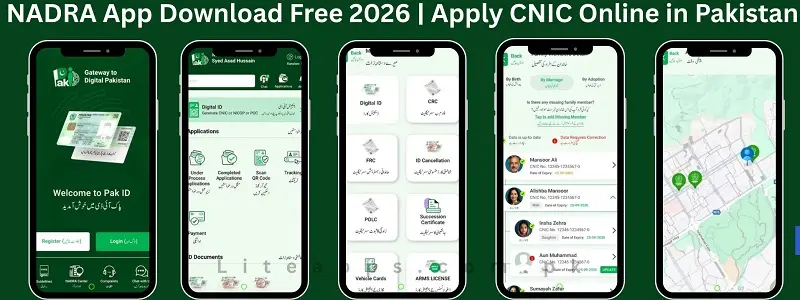
NADRA stands for National Database and Registration Authority, an official GOVT platform that allows citizens of Pakistan to manage identity services from their phones. It connects users with digital facilities related to CNIC, Smart Card, NICOP, and family registration records. Through Nadra Pak ID Mobile App, people can apply for new documents, renew expired cards, update personal details, and upload required papers without visiting an office.
The interface is simple, secure, and designed for quick navigation. It also supports biometric verification and online payment options. This digital solution helps reduce waiting time and long queues at registeration centres. Overseas Pakistanis can also access services through the same platform. The application follows government security standards to protect personal data. By using this tool, individuals can complete important identity tasks in a fast and convenient way while staying at home.
What is NADRA App ?
The Pak ID Nadra app is a smart online service that helps people handle identity work using their mobile phone. This system is regulated by the Ministry of Interior of Pakistan. It is designed for citizens who want fast and easy access to government registration services. Through this platform, users can submit requests for ID cards, correct mistakes in their records, and check progress without standing in long lines.
The system guides users step by step and keeps their information protected. It also allows secure digital payments. This service makes official processes simple, saves effort, and brings facilities closer to every household across Pakistan and abroad.
Key Features of Nadra Online App Pakistan
Online Identity Applications
Peoples can submit requests for new CNIC renewals modifications, or replacements directly through their smartphones. The system guides each step clearly, reducing confusion. Applicants upload required documents digitally and complete formalities without visiting registration centres physically.
Secure Biometric Verification
The application supports digital biometric capture to confirm identity. This process strengthens security and prevents misuse. Facial recognition and fingerprint verification ensure that records remain accurate while protecting personal data from unauthorised access. This service is also connected with Pakistani local payment methods like Easypaisa and JazzCash, which makes the process more convenient and secure for users.
Digital Document Upload
Citizens can scan and upload supporting papers within the platform. Clear instructions help users attach correct files. This feature removes paperwork hassle and speeds up processing by sending information directly to the official database.
Real-Time Application Tracking
Applicants can monitor progress using their tracking number inside the app. Status updates appear instantly, helping users stay informed. This option reduces uncertainty and limits unnecessary visits or repeated enquiries.
Online Fee Payment System
The platform enables secure electronic payments through debit or credit cards. Transactions complete within minutes. This digital method saves time, eliminates cash handling, and provides instant confirmation receipts for record keeping.
How To NADRA Pak ID app download
- Open Chrome on your Android phone.
- In the search bar, type Pak Identity NADRA App.
- Check the developer name to confirm it is the official authority.
- Tap the correct Pak ID APK latest version from the results list.
- Press the Download button.
- Wait for the download to complete.
- Open the application after installation.
- Allow required permissions for camera and storage.
- Register with your email and mobile number.
- Verify your account through the OTP code.
Important Safety Tips
- Do not download APK files from unknown websites.
- Always use the official Play Store link or trusted websites.
- Keep your phone updated for security.
- Never share your login details with anyone.
This method ensures safe and secure installation on your device.
NADRA Login Process
To access services, you must complete the Pak Identity login process. Enter your registered email and password. If you forget your password, use the reset option. Keep your login details safe. Never share them with anyone.
New CNIC Policy and Complete Online Process
The Government of Pakistan has made an important change. nadra introduces new policy for identity cards without birth certificates 2026. This step helps many citizens who do not have official birth documents. At the same time, digital services are now easier to use through the NADRA app. In this guide, I will explain the new policy, how the mobile system works, and how you can apply for your CNIC online without confusion.
If you want a smooth and simple process, this guide will help you understand everything in clear words.
New Update: CNIC Without Birth Certificate
Many people in rural areas and older citizens never had formal birth records. Because of this, they faced problems when applying for a Computerized National Identity Card. Now the authority has confirmed that NADRA issues CNIC without birth certificates in 2026. Instead of a birth certificate, officials may verify identity through:
- Family Registration Certificate.
- Parent or sibling record.
- Biometric verification.
- Official affidavit.
- Local administration confirmation.
This policy makes the system more inclusive. However, verification checks still remain strict to protect national records.
Who Benefits From the 2026 Policy Update
The new rule helps many groups, especially:
- People from rural areas.
- Elderly citizens without birth records
- Individuals whose documents were lost.
- Women who were never registered at birth.
Because of this policy, more citizens can now receive their legal identity.
How to Apply Online for CNIC Step by Step
If you want to apply from home, you can use the official online system. Many people ask about how to apply for an online Nadra CNIC without visiting an office. The process is simple if you follow the steps carefully.
Create a Nadra Online Account.
First, visit the official portal and create your account. You will need:
- Valid mobile number
- Email address
- Basic personal information
After registration, verify your account through OTP.
Fill the Application Form.
Enter your family details carefully. Make sure names and spellings match existing records in the family tree system.
Upload Required Documents
If you do not have a birth certificate, upload alternative proof as guided in the new 2026 policy. This may include:
- Parent or sibling CNIC copies.
- Family Registration Certificate.
- Matric Marksheet.
- B Form.
- Other supporting documents.
Biometric Verification
Complete your biometric form with your mobile camera. But in some cases, biometric verification is required at a nearby centre.
Once approved, your CNIC will be processed.
NADRA Tracking – Check Your CNIC Status
After applying, many people feel anxious. They want to know when their card will arrive. That is why tracking is important.
You can track your application by:
- Logging into your account.
- Entering tracking ID.
- Checking SMS updates.
This feature gives peace of mind.
What is the CNIC fees in NADRA 2026?
In 2026, the department offers three types of service for CNIC applications. The fee depends on how fast you want your card.
Normal Service
- Fee: Rs 750 PKR
- Time: Around 30 days
- This is the cheapest option. Choose this if you are not in a hurry.
Urgent Service
- Fee: Rs 1,500 PKR
- Time: Around 12 to 15 days
- This option is faster than normal.
Executive Service
- Fee: Rs 2,500
- Time: Around 7 to 9 days
- This is the fastest option. It is best if you need your card quickly.
These fees apply to new Computerized National Identity Card, renewal, modification, or duplicate card. Always confirm from your nearest NADRA center before payment because charges can change.
Powers Of NADRA Department in Pakistan
- NADRA is the official authority that manages identity records in Pakistan under the NADRA Ordinance 2000.
- It issues important documents like CNIC, Smart ID Card, NICOP, Child Registration Certificate, and Family Registration Certificate after proper verification.
- It creates and maintains the central national database of citizens.
- It collects biometric data such as fingerprints and facial records for secure identification.
- It keeps and updates family records including marriage, divorce, and death information.
- It provides biometric verification services to banks, telecom companies, and other institutions.
- It has the legal power to block or cancel a CNIC if fraud or false information is found, after due process.
- It can share verified data with authorised government departments for lawful purposes.
- It allows citizens to correct or update their personal information after proper checking.
- It supports courts and law enforcement agencies and registers important life events through its integrated system.
Nadra Complaint System
If you face delays or service problems, you can submit a complaint through crms nadra gov pk. This online complaint system allows you to:
- Register service complaints
- Upload supporting documents
- Track complaint progress
This system increases accountability and transparency.
NADRA helpline
If you need help regarding CNIC, Smart Card, NICOP, or online application services, you can contact the official NADRA helpline in Pakistan.
Helpline Number (Within Pakistan)
1777 (Call from mobile network)
Alternative Number (Landline)
Contact: 051-111-786-100
Nadra helpline for overseas
If you are living outside Pakistan and need assistance with identity card services or related issues, you can reach out to NADRA international helpline.
International Helpline Number
+92-51-111-786-100 – This number can be dialled from any country to contact NADRA support.
Key Benefits of NADRA PAK Identity App
- Safe system with biometric and data protection features.
- Apply for Cards, or renewal from home.
- Save time by avoiding long queues at registration centers.
- Upload documents directly through your mobile phone.
- Track application status in real time.
- Make secure online payments without visiting a bank.
- Update personal information easily.
- Access services anytime without office visit.
- Receive notifications about application progress.
- Helpful for overseas Pakistanis managing identity matters.
Conclusion
The National Database and Registration Authority mobile system has made identity services simple and accessible for every citizen. From applying for a new CNIC to updating records under the 2026 policy, the entire process is now more transparent and user-friendly. People in cities, villages, and even overseas can manage their documents without stress. With secure verification, tracking tools, and a clear fee structure, the system supports both convenience and safety.
Users can complete the NADRA app download for Android through official sources and start their application within minutes. They can also use NADRA ID card check online services to monitor status anytime. This digital shift reduces travel, saves time, and strengthens national record management. Overall, the platform brings essential registration services closer to homes while maintaining proper legal and security standards across Pakistan.
FAQs
Create an account on the official Pak Identity platform, fill in your details, upload documents, complete biometric steps, and pay the fee online. You can track progress from your dashboard.
Under the new policy, alternative verification like family record or biometric proof may be accepted if a birth certificate is not available.
Log in to your account and enter your tracking number to see real time updates online.
Related apps







Most rated apps
-
 SUGO Lite Online Call App Free Download APK for Android in 2026V2.16.0.1
 -
New
 Block Blast Game Free Download APK for Android & IOs in 2026V 9.2.3
 -
 Easy Paisa App For Android or IOs – Free Download Latest VersionV 6.5.0
 -
 Click X Game Download | Tile Matching Puzzle for Android & IOSV1.10.2
 -
New
 NADRA Pak ID Mobile App Download | Apply CNIC Online in 2026V 5.5.2
-
Most viewed apps
-
SUGO Lite Online Call App Free Download APK for Android in 2026V2.16.0.1
-
 Xena Lite Voice Chat App | Latest Version 2026 Download FreeV2.1.0.0
 -
 Squoosh App Download APK Free For Android Latest Version 2026V1.0
 -
 I Love PDF Converter App download new Version for Android & IOS3.12.0
 -
 JazzCash App Download Transfer and Receive Real Money in PKRV9.1.26
 -
 Ludo Game APK Free Download Offline App For Android or IOSV1.1.2
 -
Easy Paisa App For Android or IOs – Free Download Latest VersionV 6.5.0
-
 Screw Nuts Story Game Download For Android And IOS in 2026V1.21
 -
Click X Game Download | Tile Matching Puzzle for Android & IOSV1.10.2
-
 APK56 APK Download App And Watch New Viral Videos 2026V1.2
-