
PDF Converter PI App | Easily Convert JPG PNG or Webp to PDF
Feb 10, 2026
10.84 MB
10/02/2026
Android 7.0 or Above
10+

Description
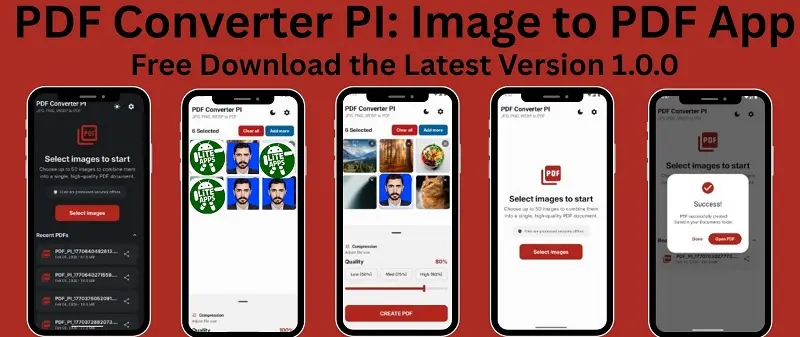
Creating a PDF file on a mobile phone should be simple, fast, and secure. After testing different tools, I found that PDF Converter PI offers one of the easiest ways to convert JPG, PNG, or WebP images into a PDF directly from a smartphone. It’s completely free and works offline, which means I can create files without internet access and keep my data private.
From my experience, this offline mobile document maker app focuses on simplicity and speed. The user interface clearly shows options like selecting images, adjusting quality, and generating the final file. These features make it useful for students, professionals, and anyone who needs a quick image to PDF converter on Android. You can free download it from Google play store.
In this guide, I will explain how the app works, its main features, benefits, and why it can be a reliable mobile document creation tool for everyday tasks.
What is the PDF Converter PI app?
It is a lightweight mobile image to PDF converter app that allows users to turn images into documents directly from their phones. Instead of uploading files to an online tool, the entire process happens inside the software.
When I explored the app interface, I noticed a very clean layout. The main screen shows a simple button labelled Select Images, which lets people pick photos from the device gallery. After selecting images, the app arranges them in a list and allows easy adjustments before creating the final PDF. Because the process works offline, it helps protect personal documents such as notes, scanned pages, or receipts.
Similar tools: ILovePDF, Squoosh App
Key Features of Free Pdf Converter PI APK
Offline Document Creation
One feature I really appreciate is full offline functionality. The app converts JPG to PDF without internet access. This means my files remain on the device, helping maintain privacy and making it useful even when no connection is available.
Adjustable Image Compression and Quality
Before creating the final file, adjust the image compression or quality level according to your need. This option helps balance clarity and file size. It is useful when users need a smaller document for sharing or a higher resolution version for printing.
Fast Multi-Image Conversion
The tool supports combining several pictures into a single document. Simply select multiple images, arrange them, and generate one organised file. This feature works well for notes, scanned papers, receipts, or classroom materials.
Clean and Simple User Interface
The interface is designed with clarity in mind. Important buttons such as image selection, file creation, and settings appear clearly on the screen. Because of this layout, even Childs can understand the workflow without confusion.
Built in Recent File Access
The application also keeps a list of recently created files. Users can quickly open, review, or share previously generated documents without searching through phone storage. This small feature improves convenience during daily document management.
How To Convert Images to PDF Easily
The core function of the app is its image to PDF conversion tool. I tested the workflow by selecting several images and converting them into a single PDF document.
The process works in three simple steps:
1. Select Images
The Select Images button opens the device gallery. Users can pick multiple images at once.
2. Organize Files
After selecting images, the app displays them in a grid layout. This screen allows users to review the images before conversion.
3. Create the PDF
Finally, tapping on create it generates the document instantly. It convert your all your jpg, png or webp photos in high quality pdf documents fastly.
This simple workflow makes the app suitable for quick tasks like:
- Creating study notes.
- Saving scanned pages.
- Combining receipts into one file.
Benefits of Using an Offline PDF Maker App
- Better Data Privacy: Documents stay on the device instead of uploading to external servers or cloud storages.
- Faster Processing: It process your file entire locally which gives you instant results.
- Convenient Access: Users can convert files anywhere without needing Wi-Fi or mobile data.
- Complete free to download and free to use.
- Ads are shown less then other tools.
Disadvantages
- May not support very large PDF files.
- limited advanced tools.
- Limited format options compared to online tools.
- App is not available for low-end devices.
Tips for Creating Better PDF Documents
While using an PI image to PDF converter, a few simple tips can improve document quality.
Use Clear Photos
Take images in good lighting so the text remains readable.
Align the Pages
Straight images help create a professional document layout.
Adjust Compression Carefully
If the file needs to be shared online, reduce the size without losing too much quality. These small adjustments can make the final PDF easier to read and share.
Final words
The PDF Converter PI works as a practical tool for people who want a simple way to turn images into documents on a mobile device. The application focuses on speed, privacy, and ease of use, which makes daily file creation much more convenient. Because it works without an internet connection, I can prepare documents anywhere without worrying about connectivity or data security.
Another advantage is the clean interface that guides users through image selection, quality adjustment, and final file creation in a few quick steps. This makes it suitable for students preparing assignments, professionals sharing reports, or anyone who needs organised digital documents. This mobile converter provides a straightforward solution for transforming pictures into a well-structured document. If someone needs a lightweight, offline, and easy to use tool for mobile document creation, this application can serve as a reliable option for everyday tasks.
FAQs
Yes. The utility tool works completely offline, so users can create image to PDF files without spending internet data.
Yes. The app allows users to select multiple images and combine them into a single document.
Yes. Users can adjust the compression and quality level before generating the final PDF file.
Related apps






Most rated apps
-
Updated
 SUGO Lite Online Call App Free Download APK for Android in 2026V2.17.0.1
 -
Updated
 Block Blast Game Download free APK for Android & IOs in 2026V 9.3.2
 -
 Easy Paisa App For Android or IOs – Free Download Latest VersionV 6.5.0
 -
 Click X Game Download | Tile Matching Puzzle for Android & IOSV1.10.2
 -
Updated
 NADRA Pak ID Mobile App Download | Apply CNIC Online in 2026V5.5.3 1
-
Most viewed apps
-
UpdatedSUGO Lite Online Call App Free Download APK for Android in 2026V2.17.0.1
-
Updated
 Xena Lite Voice Chat App | Latest Version 2026 Download FreeV2.1.0.0
 -
 Squoosh App Download APK Free For Android Latest Version 2026V1.0
 -
 I Love PDF Converter App download new Version for Android & IOS3.12.0
 -
Click X Game Download | Tile Matching Puzzle for Android & IOSV1.10.2
-
 JazzCash App Download Transfer and Receive Real Money in PKRV9.1.26
 -
Easy Paisa App For Android or IOs – Free Download Latest VersionV 6.5.0
-
Updated
 Ludo Game APK Download for Android & iOS Play Offline MatchesV1.1.6
 -
 Tile Club Game Download APK | Match Puzzle App Latest VersionV 3.3.2
 -
Updated
 Screw Nuts Story Game Download APK For Android in 2026V1.21
-