
Seedance2.0 App AI Video Helper | Download & Create Short Clips
Feb25, 2026
APK Size 41.8 MB
V2.02
Android 6.0+
9999+

Description
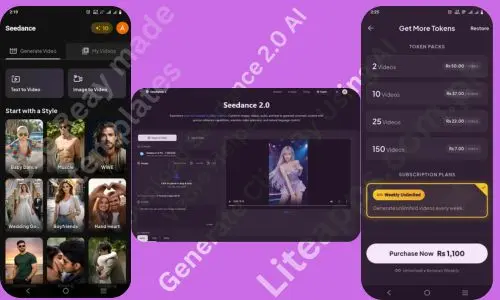
Seedance 2.0 is an emerging AI software built to support modern digital creation through smart automation and multi-modal technology. From my research and analysis, it is positioned as an advanced AI-powered platform developed in China that focuses on intelligent content generation and productivity support for businesses and creators. The Seedance2.0 app allows users to make short videos, audio, and text prompts to generate cinematic style visuals using simple natural language commands.
However, the original version offers limited yet practical features, mainly centred on basic AI video creation, media blending, and structured output control. It does not replace professional editing software, but it simplifies creative tasks for beginners and small teams. Instead of hype, I prefer to share realistic insights so you can clearly understand its strengths and boundaries. If you want a lightweight AI tool for guided visual storytelling and content automation, it may suit your workflow needs.
In this article, I will explain everything you need to know about Seedance 2.0 AI video helper, how it works, its features, real-world uses, and whether it is worth your time.
Core Features of Seedance2.0 App
High-Quality AI Video Output with Sharp Visual Detail
The system generates high-quality videos with clear resolution and refined visual depth. The system focuses on delivering sharp frames, balanced colours, and smooth rendering so creators can produce professional-looking short clips suitable for social platforms and digital marketing use.
Ready To Use Templates
You can create videos using ready made templates. Select style templates, add text or images, then generate AI videos quickly with cinematic effects, smooth motion, and professional visual storytelling.
For example, you can use Baby Dance template to create cute baby dance videos, Muscle for fitness or gym style clips, Wedding for romantic marriage scenes, and Kissing/Hugging templates for love or emotional videos.
Cinematic AI Content with Professional Visual Style
The app is designed to create cinematic content that feels dramatic and immersive. It enhances scene composition, visual tone, and storytelling flow, helping individuals achieve a film-like atmosphere without advanced editing skills or expensive production equipment.
Text to Video Creation
The app converts written prompts into short cinematic clips using natural language understanding. Users simply describe a scene, action, or idea, and the AI generates matching visuals, making video creation possible without filming or complex editing skills.
Extra Level Motion Stability for Smooth Video Flow
It maintains strong motion stability during AI video generation. Movements appear natural and fluid, reducing frame distortion or shaking. This stability improves viewer experience and makes short AI-generated videos look more realistic and polished.
Full Creative Control
The platform provides performance-level control over lighting effects, shadow depth, and camera motion direction. Creators can guide scene angles, brightness balance, and movement style through prompts, allowing better customisation and more creative flexibility in every generated clip.
Image to Video Generation
The tool allows users to transform a single image into a dynamic short video using advanced motion prediction technology. The system analyses visual elements, adds smooth transitions, and creates natural movement to make static pictures feel alive and engaging.
Multi-Modal Media Blending
Seedance2.0 app supports combining images, short clips, and audio into one structured output. This feature helps creators build simple visual stories while keeping control over references, timing flow, and overall presentation without advanced technical knowledge.
Add End Frame Control
Users can insert a custom end frame to complete their generated video smoothly. This option improves storytelling structure, ensures better scene closure, and makes short clips look more polished and intentional for social media sharing.
Step By Step Guide to Create Videos in Seedance2.0 App
Creating videos is very simple. You do not need professional editing skills. Follow these easy steps:
Open the App
Install and launch Sedance 2.0 on your device. Sign in or create an account to start.
Choose Creation Mode
Select your preferred option:
- Image to Video
- Text to Video
Upload Image or Enter Text
- If you choose image mode, upload a clear picture.
- If you select text mode, write a short description of the scene you want.
Adjust Settings
Set video length or Resolution, motion style, lighting, camera movement, and add an end frame if needed.
Generate the Video
Click the generate button. The AI will process your input and create a short cinematic clip.
Preview and Download
Review the result, make small changes if required, then download your finished video.
How to Access Seedance 2.0 AI
The safest way to explore this tool is to download the app through Google Play Store. I always recommend using official sources to avoid security risks and malware issues. However, many third-party websites also share Seedance 2.0 APK files. Choose a trusted web and then download it form there. Always scan downloaded files with security software before installation to protect your device from malware or harmful scripts.
My Experience With Seedance
When I first installed The Seedance 2.0 APK, I wasn’t sure what to expect. But within minutes, I realized how intuitive it was. The APK worked smoothly on my phone, and the desktop version felt professional. Although the tool is a bit costly, the video quality is excellent and gives a premium cinematic feel.
I tested it for content creation, and the results were impressive. The tool generated ideas quickly, and I could refine them with ease. Unlike some AI tools that overwhelm users with complex settings, it kept things straightforward. The slightly high price feels justified because of its high-quality video generation performance.
Pros and Cons
pros
- Easy video creation from text and images without advanced editing skills.
- Supports multi-modal input including audio, visuals, and prompts.
- Generates visually appealing short clips with motion stability.
- Offers creative control over lighting, shadows, and camera movement.
- Simple interface suitable for beginners and small creators.
- Structured output helps produce social media-ready content fast.
- Useful for multilingual content and global audiences.
- Saves time compared to manual video production.
Cons
- Pricing plans are relatively expensive for many beginners and small creators.
- Only short videos around 12 seconds can be generated.
- Mainly focused on video generation and does not strongly support content writing or detailed information tasks.
- Does not use multiple images to make a video.
- Limited usefulness for users needing multi-purpose AI assistance.
- Free Version contain ads.
Seedance 2.0 Pricing Plan
Token Packs:
- 2 Videos → Rs 50 per video
- 10 Videos → Rs 37 per video
- 25 Videos → Rs 22 per video
- 150 Videos → Rs 7 per video
Subscription Plan:
- Weekly Unlimited Plan available
- You can generate unlimited videos every week
- Price of weekly plan is Rs 1,100
- Subscription renews automatically every week
In simple words, the more videos you buy, the cheaper each video becomes. The weekly plan is best for users who want unlimited video generation.
Future of Seedance 2.0 App
The future of Seedance2.0 looks very promising in the AI technology world. If the app adds multi-image support, then creators will easily build more detailed video stories. Also, if pricing plans become more affordable, many beginners will try this tool without financial pressure. Moreover, increasing video generation time will help users create longer and more meaningful cinematic content. In addition, providing free credits for new users will attract more beginners and boost platform popularity. Eventually, these improvements can create a big revolution in AI video creation technology. Therefore, it may become a powerful creative platform for global content makers in coming years.
Conclusion
Seedance2.0 app emerges as a useful AI-powered video creation tool for beginners, marketers, and small content teams who want fast automation. Moreover, its text to video and image to video capabilities make storytelling simple and accessible without advanced editing knowledge. Additionally, the cinematic visual quality, motion stability, and multi-modal media blending provide strong creative value for short social media content production.
However, the platform still has limitations such as short video duration, pricing barriers, and restricted multi-image support. Despite this, its structured output system and user-friendly interface make it attractive for modern digital creators. Furthermore, future upgrades like longer video support, affordable subscription models, and enhanced AI learning features may improve overall performance. Ultimately, it represents a promising step in AI-driven content automation, offering efficiency, creativity, and convenience for evolving digital storytelling needs across global audiences and emerging online platforms.
If you are a freelancer or blogger then use these tool for better image quality: Squoosh App, ILovePdf Converter
FAQs
It gives some free credits but these tokens are not enough to generate any vedios clip so the answer isNo, you cannot use it for free.
No, currently it mainly supports short videos around 12 seconds duration.
Yes, its simple interface and templates make it easy for beginners to create AI videos.
Related apps








Most rated apps
-
 SUGO Lite Online Call App Free Download APK for Android in 2026V2.16.0.1
 -
New
 Block Blast Game Free Download APK for Android & IOs in 2026V 9.2.3
 -
 Easy Paisa App For Android or IOs – Free Download Latest VersionV 6.5.0
 -
 Click X Game Download | Tile Matching Puzzle for Android & IOSV1.10.2
 -
New
 NADRA Pak ID Mobile App Download | Apply CNIC Online in 2026V 5.5.2
-
Most viewed apps
-
SUGO Lite Online Call App Free Download APK for Android in 2026V2.16.0.1
-
 Xena Lite Voice Chat App | Latest Version 2026 Download FreeV2.1.0.0
 -
 Squoosh App Download APK Free For Android Latest Version 2026V1.0
 -
 I Love PDF Converter App download new Version for Android & IOS3.12.0
 -
 JazzCash App Download Transfer and Receive Real Money in PKRV9.1.26
 -
 Ludo Game APK Free Download Offline App For Android or IOSV1.1.2
 -
Easy Paisa App For Android or IOs – Free Download Latest VersionV 6.5.0
-
 Screw Nuts Story Game Download For Android And IOS in 2026V1.21
 -
Click X Game Download | Tile Matching Puzzle for Android & IOSV1.10.2
-
 APK56 APK Download App And Watch New Viral Videos 2026V1.2
-