
XRecorder APK – Screen Recorder App Latest Version for Android
Mar 5, 2026
APK Size 22.80MB
V2.5.0.1
Android 8.0+
99999+

Description
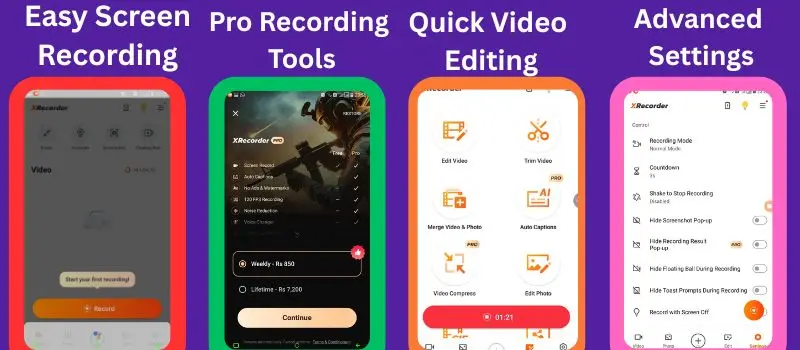
Recording your mobile display has become very important today. Whether you want to create a gaming tutorial, record an app guide, or save a video call, a reliable screen recorder makes the process simple. One app that many Android users trust is XRecorder APK – Screen & Video Recorder.
From my experience, the software offers a clean interface, stable performance, and useful editing tools in one place. It allows people to capture HD or Full HD videos, take screenshots, and even trim or merge clips after saving. The app also provides a floating control button that helps start or stop recording quickly without interrupting on-screen activity. In this guide, I will explain how this application works, its main features, video settings, and why it has become one of the most popular tools available for Android users.
What is the XRecorder screen recorder app?
The X Recorder app is a mobile application designed for Android devices that allows people to capture activities happening on their phone display. People often use it to save gameplay, create tutorials, record live streams, or demonstrate how different apps work. The main goal of this tool is to provide smooth performance, clear video quality, and helpful editing options within one platform.
The interface is clean and easy to understand, so new users can start using it without confusion. When opening the application for the first time, a simple dashboard appears with options such as record, screenshot, facecame, floating control, and video editing tools. This organised layout makes navigation quick and allows users to access features without searching through complicated menus.
Why Many Android Users Choose XRecorder APK
Many screen capture tools are available for Android, but Screen Recorder App – XRecorder attracts attention because of its stability and user-friendly design. The application focuses on convenience, smooth performance, and quick access to essential functions.
Simple One-Tap Recording
The large Record button allows users to start recording instantly. There is no complicated setup.
Floating Ball Control
A floating control icon appears on the screen. From this small button, you can:
- Start recording
- Pause recording
- Stop recording
- Take screenshots
This feature is very useful while recording gameplay or tutorials.
No Root Required
You do not need to root your Android phone to use the app. It works on most modern Android devices.
Clean Recording Interface
While recording, the controls stay minimal so they do not block the screen.
Key Features of Xscreen Recoder APK
High-Definition Video Capture
It enables clear screen capture with resolution choices like 720p and 1080p. These options help produce sharp visuals suitable for tutorials, gaming highlights, and instructional demonstrations while maintaining stable performance on many Android devices.
Floating Shortcut Controller
A small floating shortcut appears on the display and provides quick recording access. Through this control, users can begin, pause, or finish capturing instantly without switching screens, which helps maintain smooth workflow during gameplay or step-by-step guides.
Built-in Video Editing Tools
The application includes useful editing capabilities within the same interface. Tools such as trimming unwanted sections, combining clips, and reducing file size allow quick adjustments so filming becomes cleaner and easier to share across platforms.
Facecam Overlay
Facecam overlay functionality allows simultaneous capture of screen activity and front camera footage. This feature benefits streamers, educators, and content creators who want to present reactions or explanations while showing on-screen processes.
Screenshot Capture Tool
The app offers a quick image capture tool that saves screenshots in seconds. This capability helps preserve important visuals, instructions, or results without launching a full recording session.
Flexible Recording Configuration
Various configuration settings allow adjustment of video resolution, frame rate, and bitrate. These controls help maintain smooth output while balancing device performance and storage usage for different recording situations.
Voice Commentary Support
Microphone capability enables synchronised voice narration alongside screen capture. This function helps deliver clear explanations during lessons, walkthroughs, or app demonstrations.
Clean and Intuitive Layout
The interface design remains straightforward and organised. Clearly labelled sections guide users toward recording, editing, and configuration options without complicated navigation, making the experience comfortable for beginners and experienced users alike.
Selective Area Capture
Selective area capture focuses on a specific portion of the display rather than the entire screen. This option highlights important elements during guides or demonstrations while removing unnecessary background activity.
Countdown Timer
A built-in countdown timer prepares the recording session before it begins. This delay ensures the screen is ready and positioned correctly so the captured footage starts at the intended moment.
Additional Tools Available in XRecorder
Inside the tools section, the app provides some extra utilities.
These include:
- Region Recording – Record only a selected part of the display.
- Timed Recording – Start recording automatically at a specific time.
- Voice Changer – Modify voice recordings.
- Brush Tool – Draw on the screen while recording tutorials.
Useful Recording Controls and Settings
The XRecorder app includes several options that help improve the screen capture experience and give users better control during recording.
- Recording Mode: The Normal Mode option provides stable performance and works smoothly on most Android smartphones without complicated setup.
- Countdown Timer: A short timer appears before capture begins, allowing enough time to open the desired screen or prepare the content.
- Shake to Stop: When activated, simply shaking the device ends the filming session instantly without using on-screen controls.
- Hide Recording Result Notification: This setting prevents completion alerts from appearing after a session ends, keeping the interface less distracting.
- Hide Floating Control Icon: The floating shortcut can be hidden while capturing so no control element appears in the final video.
- Background Capture Option: This feature keeps the recording process active even when the display turns off during certain activities.
How to Record Screen Using XRecorder APK Latest Version
Download and Install
Download XRecorder from the Play Store. Or if it is not available then go a trusted APK website to get the app. APK installation process little difference follow these steps to successfully get the APK in your mobile phone.
- Search for XRecorder APK – Screen Recorder on the site.
- Tap the Xrecorder Download APK button to start downloading the file.
- Wait until the APK file finishes downloading on the device.
- Go to the Downloads folder in the phone storage.
- Tap the APK file to begin installation.
- If required, enable Install from Unknown Sources in device settings.
- Tap Install and wait for the installation process to complete.
Allow Required Permissions
When opening the app for the first time, it asks for permissions such as:
- Screen recording permission.
- Storage access.
- Microphone.
- Camera.
Allow these permissions to continue.
Enable Floating Ball
Turn on the floating control button so you can start recording quickly.
Tap the Record Button
Press the button. A short countdown will appear.
Start Your Recording
Now everything on your screen will be recorded.
Stop Recording
Tap the floating control or notification bar to stop the recording. Your video will automatically save to your device gallery.
Who Should Use the XRecorder App?
The Screen recorder app is useful for many different users.
Mobile Gamers
Gamers can record gameplay and share highlights on social media.
Content Creators
YouTubers and TikTok creators can record tutorials or app reviews.
Teachers and Trainers
Educators can record lessons and share them with students.
App Reviewers
Tech bloggers often record screen guides for apps.
Simple or Xrecorder Pro Verison Comparison
| Feature | Free Version | Paid (Pro) Version |
|---|---|---|
| Price | Free to download and use | Requires subscription Weekly or one-time purchase |
| Advertisements | Ads appear during usage | Completely ad-free experience |
| Video Quality | Supports HD recording up to 1080p | Supports higher performance settings and smoother recording |
| Frame Rate | Usually limited to around 60 FPS | Can support higher frame rates such as 120 FPS on supported devices |
| Watermark | Some features may show watermark depending on settings | No watermark for cleaner professional videos |
| Video Editing Tools | Basic editing options like trimming | Advanced editing tools and additional controls |
| Voice Changer Effects | Limited access | Full access to voice effects and advanced tools |
| Custom Floating Control | Standard floating button | Customizable floating control design |
| Video Recovery | Not available | Trash recovery feature for deleted recordings |
| Ads-Free Recording | Not available | Smooth recording without interruptions |
Is XRecorder Safe to Use?
Many users worry about privacy and safety when installing recording apps. From my experience, XRecorder Android App works like a normal recording tool. It requests only basic permissions required for screen recording and file storage. However, it is always a good practice to download app from trusted store or review permissions before installing. This ensures your device stays secure.
Conclusion
XRecorder APK offers a practical solution for people who want an easy way to capture mobile display activities without complicated setup. The application combines smooth performance, clear video output, and helpful utilities inside a simple interface that beginners can understand quickly. Features such as floating control, facecam overlay, screenshot capture, voice narration, and flexible configuration provide useful options for different purposes. Gamers, educators, content creators, and technology reviewers can all benefit from its capabilities when producing guides, lessons, demonstrations, or gameplay highlights.
Built-in editing functions also allow quick adjustments before sharing clips online. The XRecorder online compatibility with most Android devices without requiring root access, making the tool accessible to a wide audience. With stable operation, organised layout, and multiple customisation settings, the platform stands out as a dependable choice for anyone who needs a convenient mobile screen capture solution for everyday use or professional content creation.
For photo Editing check this also: Squoosh app
FAQs
Yes. The basic version is free and includes screen recording and editing features. A PRO version unlocks additional tools.
Some Android devices allow internal audio recording depending on system compatibility.
The free version may show a watermark in some recordings, but certain settings or the PRO version can remove it.
Related apps



Most rated apps
-
 SUGO Lite Online Call App Free Download APK for Android in 2026V2.17.0.1
 -
Updated
 Block Blast Game Download free APK for Android & IOs in 2026V 9.3.2
 -
 Easy Paisa App For Android or IOs – Free Download Latest VersionV 6.5.0
 -
 Click X Game Download | Tile Matching Puzzle for Android & IOSV1.10.2
 -
Updated
 NADRA Pak ID Mobile App Download | Apply CNIC Online in 2026V5.5.3 1
-
Most viewed apps
-
SUGO Lite Online Call App Free Download APK for Android in 2026V2.17.0.1
-
Updated
 Xena Lite Voice Chat App | Latest Version 2026 Download FreeV2.2.0.0
 -
 JazzCash App Download Transfer and Receive Real Money in PKRV9.1.26
 -
 Squoosh App Download APK Free For Android Latest Version 2026V1.0
 -
Easy Paisa App For Android or IOs – Free Download Latest VersionV 6.5.0
-
Click X Game Download | Tile Matching Puzzle for Android & IOSV1.10.2
-
 I Love PDF Converter App download new Version for Android & IOS3.12.0
 -
 Ludo Game APK Download for Android & iOS Play Offline MatchesV1.1.6
 -
 Tile Club Game Download APK | Match Puzzle App Latest VersionV 3.3.2
 -
 Maryam ko Batayn App – Download APK and Apply 10000 SchemeV1.1.0
-