

In today’s digital world, images are used everywhere from social media to websites and mobile apps. Each platform has different requirements, so a single image format cannot meet every need. That is why photo conversion is helpful.
It allows an image to be changed into a more suitable format for a specific purpose. As a result, images can open quickly, appear sharp, and run smoothly on various devices. This process was designed to fix common issues and make sharing images easier. It also supports better storage use and improves overall performance in a simple and effective way.
Types of Image Formats and Their Uses
There are many image formats like HEIC, JPG, PNG, WebP, GIF, and many more each one has its own usage. JPG is mostly used for photos, PNG is used for logos or graphics, WebP is used on modern websites for better speed, HEIC is used in iPhones or Apple devices, and GIF is used for simple animations.
If you run a blog or website, you should use photo conversion to keep your site fast and smooth. Even for personal use, it is helpful when sending images online or uploading them to apps. So yes, using image conversion is a smart and useful step for everyone today.
Common Issues With These Formats
- JPG images lose quality if they are repeatedly edited and saved it compresses again, which reduces clarity and makes the image look blurry over time.
- PNG keeps high quality and supports transparency, but this also increases file size, which can slow down loading and uploads.
- GIF uses a small colour range, so it is not good for detailed images and may appear rough or pixelated.
- WebP is efficient and modern, but older devices or software may not support it, causing display issues.
- HEIC is mainly used by Apple devices, so it may not open easily on other systems without extra support. The files can be hard to open or share without converting.
- Large images can slow down website loading.
- Some formats are not supported on all platforms.
To solve all these problems, we have brought a powerful all in one tool for you. In this article, we will share a simple and honest review of about this tool so you can easily manage and convert your images without any trouble.
Squoosh App Latest Image Converter Tool – Review 2026
The Squoosh app is a free online image converter made by Google that helps users compress and change photo formats without losing much quality. It works directly in the browser, so you do not need to install anything. This tool supports many formats and gives a real time preview while editing. Because of local processing, your files stay safe on your device.
Many bloggers, freelancers, designers, and students use this platform to reduce image size, improve loading speed, and manage media easily. It is simple, fast, and works even on low end systems, which makes it a reliable choice in 2026.
What is the Squoosh App and How It Works?
Squoosh Online is a web-based image optimisation tool that converts and compresses images using modern codecs. It runs inside your browser and uses your device power instead of cloud servers. This means your pics do not upload anywhere.
First, you upload a photo. Then, you select a format like JPEG, PNG, HEIC, or WebP. After that, you can adjust quality settings and see changes instantly. Finally, you download the optimised file. This process is smooth and quick, so even beginners can use it without confusion.
Key Features of Squoosh Desktop App
Real Time Image Preview
the tool shows a side by side comparison of original and compressed images. This helps users clearly see quality changes before downloading. It makes decision making easy and ensures that picture clarity stays acceptable after conversion.
Multiple Format Support
Squoosh supports formats like JPEG, PNG, WebP, AVIF, and more. Users can easily convert between formats based on their needs. This flexibility helps in web optimisation and improves compatibility across different platforms and devices.
Advanced Compression Control
You can manage graphic quality, resize dimensions, and adjust settings like colour and compression level. This gives full control over output size and clarity, which is useful for bloggers and developers.
Safe and Secure Processing
All image processing happens on your device. No file is uploaded to any server. This makes the app a safe option for handling private or sensitive files without privacy risks.
Target Users and Primary Use Cases
The Sqoosh Web app is useful for many types of people. Bloggers like us use it to reduce image size for faster website speed. Developers optimise images to improve page performance. UI designers adjust the quality of graphics for better visuals. Students and normal users convert images for sharing and storage.
Common use cases include:
- Website image optimisation.
- Reducing file size for email or upload.
- Converting HEIC to JPG or other formats.
- Preparing images for social media.
- Saving storage space.
Getting Started with Squoosh in 2026
System Requirements and Platform Compatibility
- Works on Chrome, Edge, Firefox, and Safari
- Supports Windows, Android, macOS, and Linux
- No high system requirement needed
- Runs smoothly on basic devices
Squoosh App Download and Installation on Android
- Visit the Google Play Store
- Search Sqoosh app
- Click on the install button the file will automatically be installed on your mobile.
Supported File Formats and Conversion Options
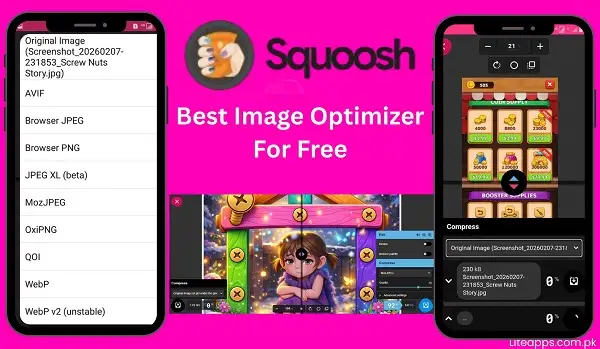
The Squosh app supports many modern and traditional image formats. These include:
- JPEG for photos
- PNG for graphics
- HEIC Files
- WebP for web optimisation
- AVIF for advanced compression
- GIF for simple animations
- MOZJPEG
- JPEG XL Beta
Users can convert images between these formats easily. For example, you can change PNG to WebP to reduce size or convert HEIC to JPEG for better compatibility. This flexibility helps in managing images for different needs.
Quality Settings and Compression Controls
The Squoosh online converter lets you manage visual output with great precision. You can fine-tune image reduction through simple sliders, making it easy to balance clarity and size. Decreasing the level shrinks the file, while increasing it preserves sharp details.
The tool also supports dimension adjustment by modifying width and height, helping eliminate extra pixels. In addition, you can tweak colour options and strip unnecessary metadata to further minimise storage usage.
Advanced Tools and Functionality
the platform provides several powerful options to enhance editing. A zoom feature allows you to inspect fine details closely, ensuring better results. It also includes a split comparison view so you can evaluate changes instantly.
Another key capability is format selection, where you can pick different encoding techniques depending on your requirements. This makes it easier to achieve the right balance between appearance and image weight. Furthermore, the drag-and-drop option simplifies the process, making editing quicker and more convenient.
Updates and Future Developments
The Squoosh Image converter app is getting better with regular improvements. The team is focusing on stronger image compression methods to reduce size while keeping good quality. Modern formats like AVIF are already available, and support for more advanced formats may come soon.
Speed and overall performance are also improving. The interface feels smoother and extra responsive with each update. In 2026, the tool is expected to deliver faster results and an easier user experience. These changes clearly show that the app is evolving and staying relevant for current digital needs.
Conclusion
Squoosh is an easy and effective photo conversion tool that makes handling files simple for all users. It delivers quick results, keeps your data private, and supports multiple formats for different needs. Since it runs in the browser, you do not need to install any software. This makes it suitable for both beginners and skilled users.
If your goal is to compress images, boost website speed, or change file types, this tool can do the job without difficulty. It is free, secure, and very simple to use. In today’s online world, picture optimisation matters a lot, the app helps you to handle it with ease.
So, if you need a dependable image converter in 2026, try the Squoosh online app and experience a smoother and faster workflow.
FAQs
Yes, it is a free image converter with no subscription fees or hidden costs for all features.
Sqooush.app supports major formats including JPEG, PNG, WebP, AVIF, GIF, and SVG for both input and output conversions.
Sqooush can handle large image files, but processing speed may vary depending on your device’s specifications and available memory.